Get Started


Key Takeaways
Modern consumers demand high-performance experiences. In 2026, the cart abandonment rate is approximately 70.22%, and research shows that 66% of shoppers will defect to Amazon if a site’s search fails to return relevant results.
95% of WordPress vulnerabilities reported in 2025 originated from plugins. Consolidating critical site functionality into one managed solution mitigates security risks and reclaims hours lost to manual maintenance.
Transitioning from a fragmented stack to a unified eCommerce solution reduces a store’s total cost of ownership (TCO), technical debt, and operational friction. Choosing to invest in one managed solution over extensions can streamline sites for better performance.
Leaders should evaluate their current technical stack to identify where integrated infrastructure can replace redundant premium plugins and add-ons. Using a single vendor for performance, AI-powered search, and automated site management simplifies troubleshooting and provides the stable foundation necessary for scaling global online stores.
The freedom to add functionality as needed is one of the main reasons eCommerce store owners choose to build on WooCommerce®[1]. If you need performance tuning, help with conversions, or help with site maintenance, there is almost certainly a solution built for that need.
As stores grow, they reach a tipping point where this freedom becomes fragile. Disparate systems for optimizing performance, driving conversations, and automating site maintenance create a siloed store experience in which each tool has no awareness of the others. And when something goes wrong, store owners are left to pinpoint the problem. Developer hours are consumed by maintenance, troubleshooting, and firefighting rather than implementing the next generation of eCommerce innovation, like personalization or app-like mobile experiences.
To scale stores with confidence, WooCommerce sites must transition from this fragmented setup into a unified, managed eCommerce solution that’s built for speed and scalability.
The dangers of a fragmented tech stack
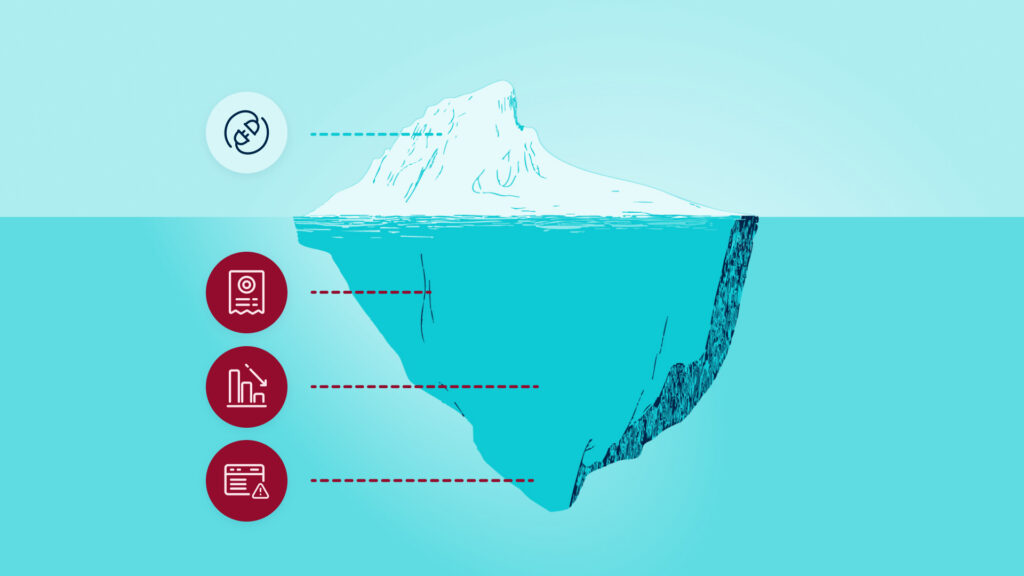
While using different solutions for site performance, conversion optimization, site management might seem harmless, the cumulative effect can create deep technical debt. Eventually, a store’s backend complexity will begin to manifest as frontend friction, and modern consumers have zero patience for a poor user experience. Both store owners and shoppers feel the weight of a fragmented tech stack.
Performance degradation
Each additional WooCommerce integration comes with its own scripts, styles, and database queries. These unoptimized requests typically fire for every page load, bloating Time to First Byte (TTFB). When dozens of tools compete for server resources, the result is a sluggish experience that frustrates users and hurts SEO.
An unoptimized tech stack is particularly lethal on mobile devices, where processing power and connection speeds vary. A slow mobile experience risks pushing away more than half of your shoppers.
Broken buyer journeys
According to 2026 data from the Baymard Institute, the average cart abandonment rate is 70.22%. While most of these shoppers cite “just browsing” as their reason for leaving, the remaining reasons for abandonment are often directly related to a poor website or checkout experience.
Whether it’s slow load times or a checkout process that can’t calculate a customer’s total upfront, streamlining the shopping experience requires a tough choice: add another extension for additional functionality and risk performance issues, or cut functionality and risk a poor user journey.
Search frustration
Consumer expectations are set by retail giants like Amazon, and basic WordPress®[1] search often falls short of these standards. Constructor’s 2025 State of eCommerce report found that quality search is a major barrier for retailers. According to the report:
- Only 23% of shoppers start their product search directly on brand or retailer sites.
- 68% of shoppers find site search to be a persistent issue. This number has not changed between the 2024 and 2025 reports, suggesting that search functionality is not keeping up with the demands of modern users.
- 66% of shoppers will defect to Amazon if they don’t get relevant results.
- 55% of shoppers would pay more for a product if the discovery experience were smoother.
To get the most value from users shopping directly on your site, providing highly relevant search results is a non-negotiable. A broken search bar is effectively a referral to your biggest competitor, but quality search often means adding another plugin to the stack.
Wide security surface area
95% of documented vulnerabilities in 2025 came from plugins. Maintaining a DIY stack means trusting the security practices of dozens of different developers, testing updates and checking for conflicts on your own time, and always being on-call when an issue arises.
If even one plugin in 30 is outdated or poorly coded, your entire store, including your customers’ data, is at risk. This can lead to unexpected downtime, lost sales, and loss of customer trust.
Developer drain
There’s one major cost associated with a fragmented tech stack that won’t show up on any invoice. We call it the developer tax. A development team spending five hours a week resolving plugin conflicts or manually testing updates may not seem like a lot at first. Over the course of a year, it equates to 260 hours stolen from building new revenue-generating features. That’s six and a half weeks of work, just on plugin maintenance. That level of manual maintenance can quickly become an obstacle to growth.
Plugin payout
When you rely on a DIY stack, foundational functionality is often built through individual premium plugin licenses. Even at a modest average of $20 per year per plugin for a single license, a store running just 20 premium plugins suddenly faces a $400 in annual plugin fees.
In reality, many plugins cost significantly more, ranging from $79 to $299 annually. This creates a cycle where you are paying multiple different vendors for disjointed and sometimes redundant features.
Silently swelling TCO
Each of these dangers is difficult to deal with on its own, but together, they combine into a sneaky total cost of ownership (TCO) problem that won’t appear neatly on any invoice.
Sure, you might see your software costs slowly going up as you add more plugins and add-ons to solve performance or search issues. You might even notice rising developer costs as your team spends additional hours on maintenance, testing and troubleshooting. But the secret revenue killer is the risk of lost conversions.
Slower load times reduce conversions and increase bounce rates. Users’ inability to effectively search for products takes another chunk out of your sales. Next, your paid traffic strategy becomes less effective, increasing your customer acquisition cost (CAC). In the event of a site outage, even a small one, your store loses sales and customers lose trust in your ability to provide a secure shopping experience, leading to poor customer satisfaction rates.
What originally looked like a low-cost, flexible setup quickly becomes a high-risk, high-TCO operating model that silently bleeds your profits.

What changes when you choose a managed eCommerce solution?
Shifting your strategy isn’t about simply removing tools, but about aligning your most critical store infrastructure. A managed eCommerce solution unifies site performance, on-site search, checkout, and maintenance operations into a single platform. Creating one system in which all the most critical components of site success are deeply entwined is the thinking behind WP Engine’s eCommerce solution.
Our fully managed platform for eCommerce offers an integrated alternative to a fragmented stack, taking essential store functionality out of the plugin layer and into your infrastructure.
Integrated performance features
Rather than layering on caching plugins, WP Engine uses four distinct performance features, each of which solves a different layer of the slow performance problem.
It all starts with EverCache® for WooCommerce. This server-level optimization handles the heavy lifting of high-traffic eCommerce without bloating a site’s code, and cached pages load up to two times faster for shoppers. It differentiates itself from WP Engine’s standard EverCache by including Live Cart. The feature ensures users’ carts remain responsive and fast, eliminating the need for plugin-powered cart optimizations.
NitroPack handles CSS, JavaScript, and image optimization, delivering an average 30% improvement in desktop scores and 128% on mobile. For a store with $1M Gross Merchandise Volume, a one-second delay can cost roughly $70K in revenue per year. NitroPack helps stores recover revenue lost to slow loading.
Dynamic Plugin Loading further improves load times by giving store owners more granular control over which plugins load on which pages. Rather than forcing every plugin to load on every page regardless of whether it’s needed, users can add rules to disable plugins on pages where their functionality isn’t necessary without touching a single line of code. Dynamic Plugin loading has been shown to reduce page size by over 30% on average. Less page bloat results in faster site speed.
Underneath it all, Slow Query Monitor acts as the database watchdog. It monitors for slow database requests that can silently drag down site performance. It identifies and alerts store owners about queries that may not result in site errors, but can cause slowdowns that affect conversion rates.
Four layers, one system, no separate subscriptions. That is what performance looks like when performance is embedded in your infrastructure rather than tacked on via extensions.
AI-powered search and product recommendations
By integrating Smart Search directly into the platform, sellers can provide the Amazon-like discovery experience customers expect without the overhead of complex third-party search integrations. Smart Search AI understands natural language patterns to surface the most relevant products for a user, even if the keywords used aren’t an exact match for the product description. So, users who misspell a product name or enter a term that isn’t used on a product page can still surface your top-selling products.
Intelligent plugin loading and upkeep
You’ll still need plugins to build a successful WooCommerce site. To manage the plugins you do need, the Smart Plugin Manager uses visual regression testing to ensure updates don’t break your site. It automates the maintenance cycle, keeping your store secure with zero manual effort. To make sure those plugins don’t tank your performance, Dynamic Plugin Loading prioritizes which plugins load on each page and provides a framework to disable plugins on a page-by-page basis to reduce bloat.
Consolidated support
With your site search, performance features, and hosting unified under a single vendor, you also get the benefit of unifying your support experience. These store owners reduce the back-and-forth between vendors, and when an issue arises, they know exactly who to call. And with WP Engine’s award-winning support team, you can rest assured that your issue will be resolved quickly by a team of experts with WordPress-specific understanding.
From fragile to formidable
Rethinking a fragmented tech stack can help WooCommerce store owners reduce time and money spent on tool management to focus on brand growth. Generating revenue requires a foundation built for scale and stability, and simplifying your infrastructure lowers your store’s TCO by reducing overhead costs and freeing your team to focus on building an experience that drives conversions.
Ready to simplify your store’s operations, lower your TCO, and boost performance? Explore WP Engine’s eCommerce Solution today.
FAQs
How does a heavy plugin load affect WooCommerce stores?
When a WooCommerce store uses different plugins for essential performance functionality, site management, and conversion optimization, the site risks losing speed, security, and developer time incurred by maintaining a large, fragmented stack of third-party integrations.
How does server-level optimization help my store?
Server-level optimizations, like the features built into WP Engine’s eCommerce solution, handle store performance and functionality at the hosting level. When essential performance features and tools, like caching and on-site search functionality, are built directly into your infrastructure, your store can serve content faster and handle more simultaneous shoppers without needing multiple performance-tuning plugins that can inadvertently slow down your site.
Why is site search so important for conversion?
Data from Constructor’s 2025 State of eCommerce report shows that 66% of shoppers will leave a site for Amazon if they cannot find what they are looking for immediately through a site’s search functionality. Integrated, AI-powered search tools, like WP Engine’s Smart Search AI, ensure customers find the right products quickly to reduce cart abandonment.