Get Started

Key Takeaways
Some AI chatbots can provide outdated information, creating business risks due to stale data. WP Engine’s new Model Context Protocol (MCP) server eliminates this by connecting AI agents directly to real-time website content.
MCP-enabled chatbots significantly improve business outcomes for brands. They can boost lead quality by 45% and increase conversions by 20-35% by delivering accurate, contextual answers.
Developers and agencies can deploy AI-driven features faster and more efficiently with WP Engine’s turnkey MCP solution. Simple opt-in setup reduces the need for complex RAG infrastructure and custom data pipelines.
The MCP server simplifies integration with OpenAI’s AgentKit, allowing AI agents to access live website content, and reducing development time from months to as little as seven minutes.
Your AI chatbot just answered a customer question using information from three months ago. The problem is that the product details changed last week, the pricing was updated yesterday, and now you’re apologizing to a confused lead. This isn’t just a chatbot lag issue. It’s a data connectivity problem.
AI is only as smart as its context, and currently, most AI assistants are stuck with stale, scraped data. They can’t see what changed on your website this morning, they don’t know about your latest product launch, and they’re completely unaware of the new case studies you published last week. For website owners, developers, and agencies trying to deliver intelligent customer experiences, this gap between what AI knows and what your website actually says creates real business risk.
A Model Context Protocol (MCP) server can instantly eliminate the stale data problem, and today, WP Engine is officially moving our Smart Search AI MCP Server into open beta, giving every Smart Search AI and Managed Vector Database customer the ability to connect AI agents directly to their real-time website data.
What is the Smart Search AI MCP server?
The Model Context Protocol (MCP) is a standard that lets AI applications like ChatGPT and Claude talk directly to your website’s live data instead of relying on outdated information that was scraped weeks or even months ago.
The Smart Search AI MCP server turns your website into a dynamic knowledge base that AI systems can connect to. So, next time a customer asks your AI-powered chatbot a question, it queries your website content in real time, pulling accurate answers from your current product pages, documentation, blog posts, and knowledge base articles. No more outdated responses, just accurate, up-to-date information.
Why developers, brands, and agencies should be stoked!
For agencies, this is a turnkey developer tool that helps get AI-driven features, like chatbots, to market faster while saving money on complex RAG (Retrieval-Augmented Generation) infrastructure. Instead of building custom data pipelines and managing vector databases manually, you can leverage WP Engine’s AI Toolkit and MCP server to build exceptional, modern experiences for your clients even faster.
For brands, the business case is compelling. MCP-enabled chatbots can improve lead quality by 45% and boost conversions by 20-35% according to recent industry data, because they’re providing accurate, contextual answers instead of generic responses based on stale training data.
This integration also provides the essential data connection for OpenAI’s AgentKit, a specialized suite of tools for building and deploying AI agents. While AgentKit provides the visual agent builder and ChatKit UI components, it requires a way to know your specific data and content.
By connecting our MCP server to the OpenAI Connector Registry, your AgentKit agents gain immediate access to your website’s live content. This moves AI development from months of custom coding to a simple setup that can be completed in as little as seven minutes! Your agents are no longer just guessing; they are talking directly to your product pages, documentation, and blog posts to give humans the most up-to-date information possible.
What’s new in open beta?
During closed beta, we learned that security and accessibility were the top barriers to adoption. We’ve addressed both.
To address security concerns, we added a dedicated authentication solution with built-in rate limiting to prevent DDoS issues and keep your data secure.
From an accessibility standpoint, we made a few additional changes. Previously, connecting large language models (LLMs) to your website required heavy coding, custom API work, and infrastructure management, and WP Engine customers outside the closed beta program could not connect to AgentKit. Now, our MCP server provides a turnkey solution that makes AgentKit immediately available to any customer already using WP Engine’s Smart Search AI or Managed Vector Database.
There is no price change to access these new capabilities. If you’re already using Smart Search AI or Managed Vector Database, you’re in.
How to get started
If you use Smart Search AI or Managed Vector Database, you already have access. No complex deployment, no infrastructure to provision, and no additional costs.
Simply log into the WP Engine User Portal, navigate to view your environments, and opt in to enable MCP capabilities on sites with Smart Search AI or Managed Vector Database. The authentication credentials and endpoint URL will be generated automatically.
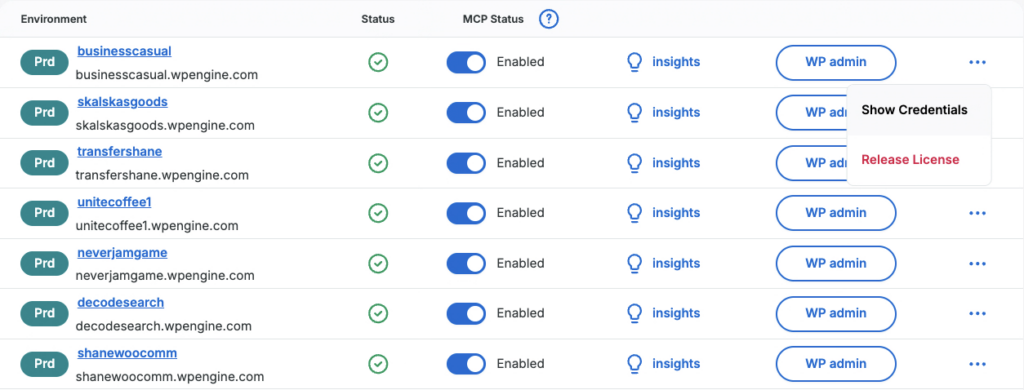
Head to the User Portal, flip the switch, and start building the next generation of real-time AI for websites built on WordPress®[1]. After you connect popular agents like OpenAI and Claude to your site via MCP, they will finally know what you know, when you know it, and push your most up-to-date content, products, and information to the humans you want to reach.
[1] WP Engine is a proud member and supporter of the community of WordPress® users. The WordPress® trademark is the intellectual property of the WordPress Foundation. Uses of the WordPress® trademarks in this website are for identification purposes only and do not imply an endorsement by WordPress Foundation. WP Engine is not endorsed or owned by, or affiliated with, the WordPress Foundation.